Researchers from 35 universities use KeepResearch.
Across China and the wider research community, researchers use KeepResearch for papers, dissertations, and long-running projects.
Logos identify researcher affiliations and do not imply institutional endorsement.
Nanjing University of Science and Technology
Southeast University
Harbin Institute of Technology
Shandong University
Huazhong University of Science and Technology
Sichuan University
Beijing University of Posts and Telecommunications
Nanyang Technological University
The University of Tokyo
Imperial College London
Technische Universität Berlin
Chalmers University of Technology
One project, from draft to delivery
A paper needs more than a text box.
Organize the project, people, and files first. Then write, compile, and revise. When a concrete task comes up, the agent can work in that same project.
01PROJECT MANAGEMENT
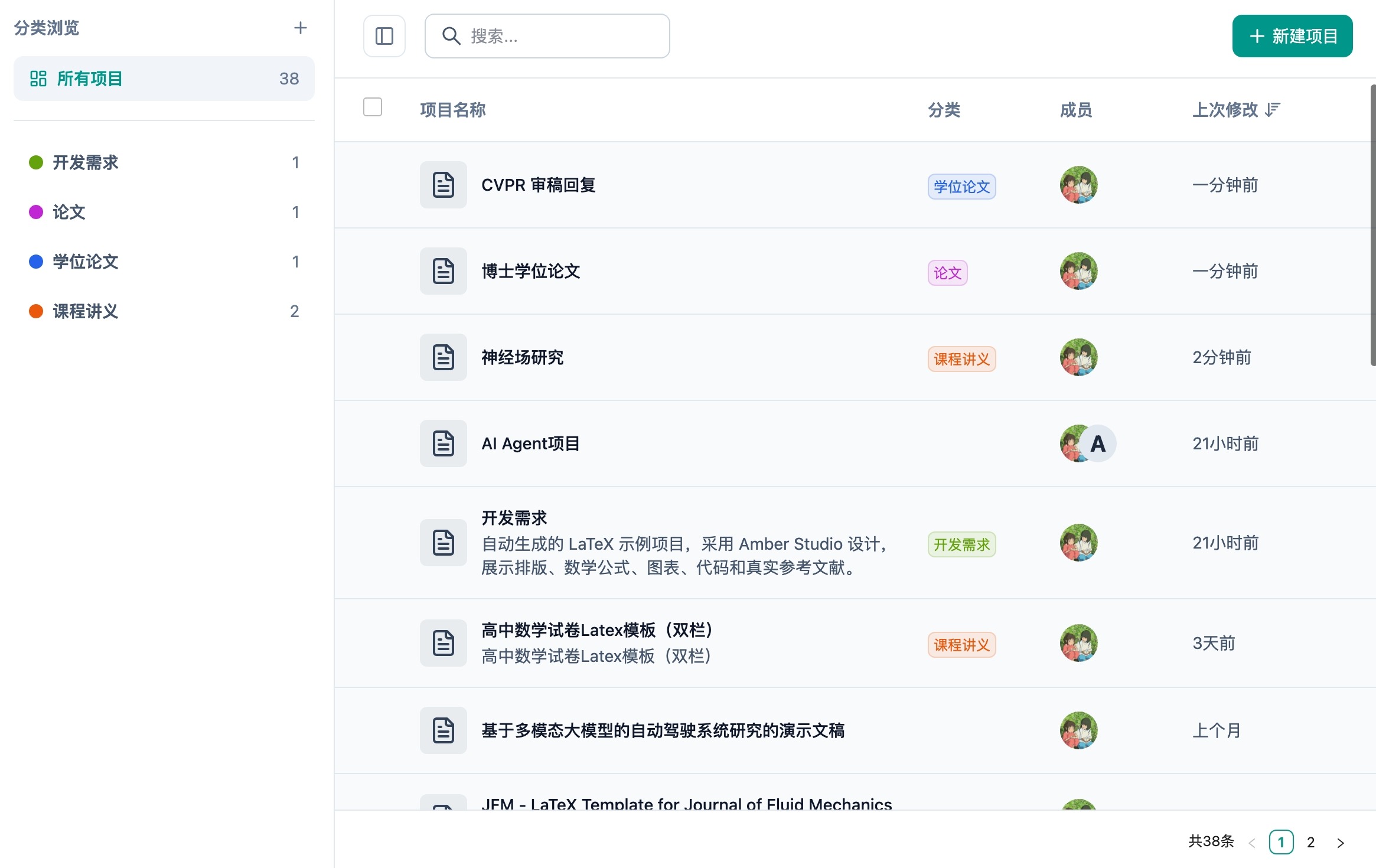
Projects, people, and recent work are easy to find.
Organize projects by category, see collaborators and recent activity, then create, clone, configure, archive, or download from one workspace.
Categories, search, and batch organization
Members, roles, and project settings
Clone, archive, and download source or PDF
PROJECT WORKSPACEProjects, members, and recent work
Categories, collaborators, and recent changes in one workspace.
02PROFESSIONAL LATEX EDITOR
Source and PDF side by side, even in a large project.
Use the project outline to move quickly, keep completion and diagnostics close to the current file, and arrange source, figures, and PDF output side by side.
Context-aware completion and hover documentation
Live diagnostics with definition and reference navigation
Project outline, file graph, and symbol graph
LATEX EDITORSource, project structure, and PDF
Navigate across sections with the project outline, complete LaTeX commands, catch live diagnostics, and inspect files, labels, and citations through the file and symbol graphs.
03PROJECT AGENT
Handle project-wide changes without leaving the editor.
The agent can start from a compile log, read and edit project files, run the compiler to verify its work, and request permission before sensitive actions.
Analyze problems with file and compile-log context
Read, edit, and synchronize across project files
Compile to verify, with permission controls
PROJECT AGENTTask, permissions, and compile check
See the agent read the project, edit files, and compile to verify the result.
Your project stays portable
From import to submission, the project stays under your control.
Import a standard LaTeX project, use the compiler it needs, restore earlier versions, and export the source or PDF at any time.
YOUR LATEX PROJECTSource, history, and PDF
EXPORT ANYTIME
01
Project structure
Files, folders, and entry document preserved
.zip import
02
Build environment
pdfLaTeX · XeLaTeX · LuaLaTeX · LaTeX
Your choice
03
Version history
Automatic and manual snapshots, ready to inspect or restore
Recoverable
04
Deliverables
Project directory, individual files, and final PDF
Download anytime
Built around real research outputs
One workspace for every form your research takes.
Use the same professional LaTeX workspace for focused papers, long-running theses, technical reports, and Beamer presentations—without giving up a real project structure.
01
Papers & preprints
Start from a journal template, coordinate source, figures, and references, then verify the build before submission.
02
Theses & dissertations
Manage chapters, appendices, and long-term history in a clear multi-file structure built for substantial documents.
03
Technical reports
Reuse team templates and project assets to produce formal reports that remain reviewable, traceable, and portable.
04
Beamer presentations
Keep presentations aligned with the paper by sharing equations, figures, and citations inside the same project.
Every output is supported by the same professional toolkit
From migration and compilation to collaboration, AI permissions, and export, KeepResearch preserves the controls that matter in a real LaTeX workflow.
01Can I import an existing LaTeX project?
Yes. Upload the existing project as a .zip archive to preserve its files, folder structure, and entry document, then continue from the project you already know.
02Which LaTeX compilers are supported?
Projects can use pdfLaTeX, XeLaTeX, LuaLaTeX, or LaTeX, so existing projects and different language or font requirements can build as expected.
03Can co-authors work in the same project?
Yes. Invite project members, manage roles and permissions, and keep everyone working from the same file structure and project history.
04What can the AI agent change?
The agent can read project context, propose and apply file changes, and compile to verify its work. File writes and command execution support explicit permission, so you remain in control.
05Can I export the source and PDF anytime?
Yes. Download the final PDF, the complete project directory, or individual files. Your research is not locked inside the KeepResearch workspace.
Get in touch
When you need help, reach a real person.
For product questions, account help, or collaboration ideas, contact the KeepResearch team directly.